Originally posted by 7thdayz
View Post
Announcement
Collapse
No announcement yet.
Still I Rise (Original)-Refined-
Collapse
X
-
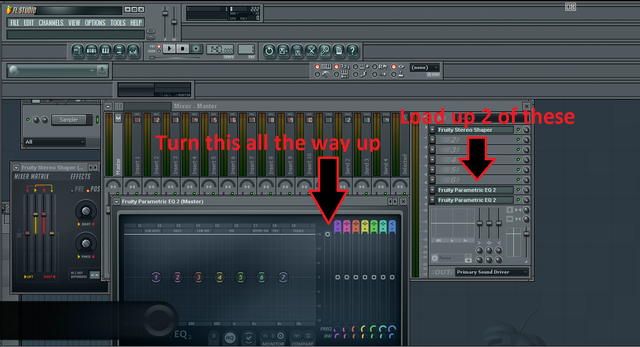
I don’t use FL Studio but I wanted to try this out so installed it and added UTEOT OG from the reference discs to try to reproduce the result you got. When I loaded that preset it just cut pretty much everything except for some parts came through extremely quiet. What am I doing wrong? Do I need to have the song added on more than one audio track for this to work? Thanks.
-
Throw a compressor on the master channel and add about 20db, is what I did lol.Originally posted by djcoma1200 View PostI don’t use FL Studio but I wanted to try this out so installed it and added UTEOT OG from the reference discs to try to reproduce the result you got. When I loaded that preset it just cut pretty much everything except for some parts came through extremely quiet. What am I doing wrong? Do I need to have the song added on more than one audio track for this to work? Thanks.
Originally posted by Flintheart_GlomgoldCalm down. This doesnt affect your life. Get over it. Its ancient history and the only thing thats certain is that you dont have all the facts. Even if you did, try to occupy your time with something more wholesome.
Comment
-
Originally posted by Klockwork Beats View PostThrow a compressor on the master channel and add about 20db, is what I did lol.Originally posted by djcoma1200 View PostI don’t use FL Studio but I wanted to try this out so installed it and added UTEOT OG from the reference discs to try to reproduce the result you got. When I loaded that preset it just cut pretty much everything except for some parts came through extremely quiet. What am I doing wrong? Do I need to have the song added on more than one audio track for this to work? Thanks.
Comment
-
Originally posted by Klockwork Beats View PostThrow a compressor on the master channel and add about 20db, is what I did lol.That will Boost the volume enough to hear the desired effect, with no distortion. If not, add one more in the same way, so you can hear it. Try it out with songs off of the 3 stolen DATs first, since its a good introduction to what it is capable of.Originally posted by djcoma1200 View PostI don’t use FL Studio but I wanted to try this out so installed it and added UTEOT OG from the reference discs to try to reproduce the result you got. When I loaded that preset it just cut pretty much everything except for some parts came through extremely quiet. What am I doing wrong? Do I need to have the song added on more than one audio track for this to work? Thanks.
Comment
-
You used a different rip of UTEOT than i used, thats why. Try different rips of it (Server/Ref/Etc). Different rips act different when run through the VST.Originally posted by djcoma1200 View PostI don’t use FL Studio but I wanted to try this out so installed it and added UTEOT OG from the reference discs to try to reproduce the result you got. When I loaded that preset it just cut pretty much everything except for some parts came through extremely quiet. What am I doing wrong? Do I need to have the song added on more than one audio track for this to work? Thanks.
Comment
-
Originally posted by Klockwork Beats View PostThrow a compressor on the master channel and add about 20db, is what I did lol.Originally posted by djcoma1200 View PostI don’t use FL Studio but I wanted to try this out so installed it and added UTEOT OG from the reference discs to try to reproduce the result you got. When I loaded that preset it just cut pretty much everything except for some parts came through extremely quiet. What am I doing wrong? Do I need to have the song added on more than one audio track for this to work? Thanks.Originally posted by therealtruealtog View PostOpera has a built in VPN, you can download it from https://www.opera.com/.
The VPN is turned on when you use Private mode.Originally posted by Ride4me View PostOmg this thread is amazing. Can’t wait to hear the og vibes that come from these. Especially on dopfunk’s instrumentals!Originally posted by Scottzilla View PostCan you upload these somewhere else for us UK cats?Originally posted by Phenomenon View Postwhat version of life goes did you use the inversion on? sounds amazingOriginally posted by Ear2thastreetz View PostWhoah! Gotta spread it before I can rep it. Nice one bro.Originally posted by DJ VeliVel View PostThat one sounds good, how many have been or can be made in that way?Lastly, and most importantly, this is a good forensic tool, to find out if songs are true mono or stereo, etc, where songs have been doctored. If it cancels the song completely out, then it wasnt legit stereo.Originally posted by Dominator View PostReminds me of the good old days of Vocal cut. Those were the very few songs that would give a decent result. Lil' Homies and When Thugz Cry too.
Its also good for seeing if 2 different rips of the same song, came from alternate, or the same source. If they truly are from different sources, they will isolate different, even if sometimes the difference is slight. So, with the pretense that certain of us members is concerned with lineage of a song, as well as anatomy, this tool is amazing for forensic examination, along with a spectrograph.
Comment
-
Ahh I think you are correct that I used the wrong rip since the vocal was completely gone. For some reason I thought you said red it was from the ref discs. I wasn’t concerned about the volume level, moreso the fact the vocal was cancelled with the rest of it.Originally posted by 7thdayz View PostYou used a different rip of UTEOT than i used, thats why. Try different rips of it (Server/Ref/Etc). Different rips act different when run through the VST.
Also, when I loaded that preset you uploaded, all 4 levels were flat in middle. In your screenshot it shows the the middle 2 strips 75% of the way up. Is that how they should be? Could be it got messed up from me using a diff version than you or Mac/Windows. Or I just imported it wrong. Not gonna lie I can’t stand FL studio lol.
Thanks for the help.
PS I’m not sure if boosting the output of a eq plugin is the best way to gain stage since EQ plugins can color the sound even when you have them flat with no boosts/cuts. Fruity Balance seems like a more appropriate plugin for that, or a limiter without it hitting the threshold.
Comment
-
Ya i wasn’t concerned about the volume (I know how to handle that) so much as the fact that the vocals were almost entirely cancelled out. Guess it was because I used the wrong rip though. Appreciate the help anyway.Originally posted by Klockwork Beats View PostThrow a compressor on the master channel and add about 20db, is what I did lol.
Comment
-
I am aware some can do that, but if you look at it on a spectrum after, this one doesnt appear to.Originally posted by djcoma1200 View PostAhh I think you are correct that I used the wrong rip since the vocal was completely gone. For some reason I thought you said red it was from the ref discs. I wasn’t concerned about the volume level, moreso the fact the vocal was cancelled with the rest of it.
Also, when I loaded that preset you uploaded, all 4 levels were flat in middle. In your screenshot it shows the the middle 2 strips 75% of the way up. Is that how they should be? Could be it got messed up from me using a diff version than you or Mac/Windows. Or I just imported it wrong. Not gonna lie I can’t stand FL studio lol.
Thanks for the help.
PS I’m not sure if boosting the output of a eq plugin is the best way to gain stage since EQ plugins can color the sound even when you have them flat with no boosts/cuts. Fruity Balance seems like a more appropriate plugin for that, or a limiter without it hitting the threshold.
If you can verify this for me though, i would be extremely greatfull.
Give me 5 minutes, and ill upload a new preset, n well find out what the issue is.
Comment
-
All levels should be at 41.3Originally posted by djcoma1200 View PostAhh I think you are correct that I used the wrong rip since the vocal was completely gone. For some reason I thought you said red it was from the ref discs. I wasn’t concerned about the volume level, moreso the fact the vocal was cancelled with the rest of it.
Also, when I loaded that preset you uploaded, all 4 levels were flat in middle. In your screenshot it shows the the middle 2 strips 75% of the way up. Is that how they should be? Could be it got messed up from me using a diff version than you or Mac/Windows. Or I just imported it wrong. Not gonna lie I can’t stand FL studio lol.
Thanks for the help.
PS I’m not sure if boosting the output of a eq plugin is the best way to gain stage since EQ plugins can color the sound even when you have them flat with no boosts/cuts. Fruity Balance seems like a more appropriate plugin for that, or a limiter without it hitting the threshold.
2 going downwards, 2 going up, in a "every other one" pattern
The first notch should be 41.3 on the bottom half, the second one 41.3 on the top half, The third notch should be 41.3 on the bottom half, the fourth one 41.3 on the top half
41.3 down, 41.3 up, 41.3 down, 41.3 up
Not sure if you know what i mean though
Comment
-
Here, lets try this one. Let me know if it works.Originally posted by djcoma1200 View PostAhh I think you are correct that I used the wrong rip since the vocal was completely gone. For some reason I thought you said red it was from the ref discs. I wasn’t concerned about the volume level, moreso the fact the vocal was cancelled with the rest of it.
Also, when I loaded that preset you uploaded, all 4 levels were flat in middle. In your screenshot it shows the the middle 2 strips 75% of the way up. Is that how they should be? Could be it got messed up from me using a diff version than you or Mac/Windows. Or I just imported it wrong. Not gonna lie I can’t stand FL studio lol.
Thanks for the help.
PS I’m not sure if boosting the output of a eq plugin is the best way to gain stage since EQ plugins can color the sound even when you have them flat with no boosts/cuts. Fruity Balance seems like a more appropriate plugin for that, or a limiter without it hitting the threshold.
P.s., (i hate FL studios also, and this tool is the only reason i keep it for. I dont make music or beats with it. I simply keep it to forensically examine songs. The isolating effect is just a plus.)
Comment
-
I know exactly what you mean by this. Thank you. It probably doesn’t have to be at 41.3 as long as they are all the same for proper phase cancellation.Originally posted by 7thdayz View PostAll levels should be at 41.3
2 going downwards, 2 going up, in a "every other one" pattern
The first notch should be 41.3 on the bottom half, the second one 41.3 on the top half, The third notch should be 41.3 on the bottom half, the fourth one 41.3 on the top half
41.3 down, 41.3 up, 41.3 down, 41.3 up
Not sure if you know what i mean though
Comment
-
Originally posted by 7thdayz View PostHere, lets try this one. Let me know if it works.
P.s., (i hate FL studios also, and this tool is the only reason i keep it for. I dont make music or beats with it. I simply keep it to forensically examine songs. The isolating effect is just a plus.)
https://mega.nz/#!j5NACSbR!8c-tnngQ5...5drBYsd-5AN8_0
Thanks I will try it this weekend. If it doesn’t work I can recreate from your explanation easily.
I have read that the stereo shaper plugin is very useful for things other than isolation (mixing). I know some of their plugins you can use as VST. Hopefully this is one.
Comment
-
Spectrogram would be difficult to spot a difference. The better way to check this would be, coincidentally, to use phase inversion. Boost it X dB with the eq plugin and export it. Then take that export and line it up with the original file boosted X dB on the track/channel volume and invert one of them. If it’s anything other than dead silence it means the eq is coloring it.Originally posted by 7thdayz View PostI am aware some can do that, but if you look at it on a spectrum after, this one doesnt appear to.
If you can verify this for me though, i would be extremely greatfull.
Give me 5 minutes, and ill upload a new preset, n well find out what the issue is.
Comment
-
It doesnt have to be 4.13, correct. These are all the possible settings. However, i have become accustomed to my method.Originally posted by djcoma1200 View PostI know exactly what you mean by this. Thank you. It probably doesn’t have to be at 41.3 as long as they are all the same for proper phase cancellation.

Hmm. Its the things in front of our eyes, that we are usually blind to. Thank you.Originally posted by djcoma1200 View PostSpectrogram would be difficult to spot a difference. The better way to check this would be, coincidentally, to use phase inversion. Boost it X dB with the eq plugin and export it. Then take that export and line it up with the original file boosted X dB on the track/channel volume and invert one of them. If it’s anything other than dead silence it means the eq is coloring it.
Comment
Who has read this thread:


Comment